Brightspace Mcp Server
Brightspace MCP Server
By Rohan Muppa, ECE @ Purdue
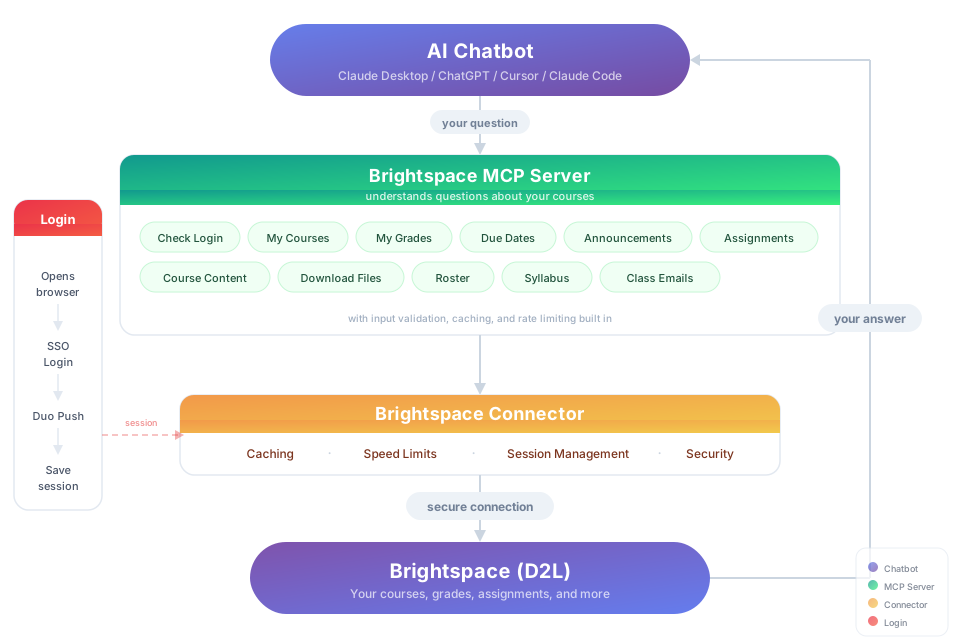
Talk to your Brightspace courses with AI. Ask about grades, due dates, announcements, and more. Works with Claude, ChatGPT, and Cursor.
This is an MCP (Model Context Protocol) server. MCP lets AI apps like ChatGPT or Claude talk to outside tools. This server connects your AI to Brightspace so it can pull your grades, assignments, and course content on demand.
Works with any school that uses Brightspace.
Try It
"Download my lecture slides and turn them into interactive flashcards" "Grab every assignment rubric and build me a visual dashboard of what I need to hit for an A"
Steps to Install
You need: Node.js 18+ (download the LTS version)
Purdue students:
npx brightspace-mcp-server setup --purdue
Everyone else:
npx brightspace-mcp-server setup
This command might take a few minutes to download, especially on Windows. Please be patient.
The wizard handles everything: credentials, MFA, and configuring your AI client. When it's done, restart Claude/ChatGPT/Cursor and start asking questions.
That's it! You're ready to go.
Session Expired?
Sessions re-authenticate automatically. If auto-reauth fails (e.g., you missed the Duo push):
npx brightspace-mcp-server auth
What You Can Ask About
| Topic | Examples |
|---|---|
| Grades | "Am I passing all my classes?" · "Compare my grades across all courses" |
| Assignments | "What's due in the next 48 hours?" · "Summarize every assignment I haven't turned in yet" |
| Announcements | "Did any professor post something important today?" · "What did my CS prof announce this week?" |
| Course content | "Find the midterm review slides" · "Download every PDF from Module 5" |
| Roster | "Who are the TAs for ECE 264?" · "Get me my instructor's email" |
| Discussions | "What are people saying in the final project thread?" · "Summarize the latest discussion posts" |
| Planning | "Build me a study schedule based on my upcoming due dates" · "Which class needs the most attention right now?" |
Troubleshooting
"Not authenticated" → Run npx brightspace-mcp-server auth
AI client not responding → Quit and reopen it completely (not just close the window)
Need to redo setup → Run npx brightspace-mcp-server setup again
Config location → ~/.brightspace-mcp/config.json (you can edit this directly)
Browser launch times out (Windows) → Open Task Manager, end all Chromium/Chrome processes, and try again. If it persists, add the Playwright Chromium folder to your antivirus exclusion list.
Auth fails in WSL or Docker → Chromium dependencies may be missing. Run npx playwright install-deps chromium to install them. The server automatically adds --no-sandbox for these environments.
Headless login fails (Windows) → SSO login flows can fail in headless mode on Windows. The default is headed (a browser window opens). If you set D2L_HEADLESS=true and auth fails, switch back to headed mode.
Security
- Credentials stay on your machine at
~/.brightspace-mcp/config.json(restricted permissions) - Session tokens are encrypted (AES-256-GCM)
- All traffic to Brightspace is HTTPS
- Nothing is sent anywhere except your school's login page
Built With





Updates
Automatic. Your AI client pulls the latest version every time it starts. No action needed.
Proudly made for Boilermakers by Rohan Muppa 🚂
Report a bug · AGPL-3.0 · Copyright 2026 Rohan Muppa
Server Config
{
  "mcpServers": {
    "brightspace": {
      "command": "npx",
      "args": [
        "-y",
        "brightspace-mcp-server@latest"
      ]
    }
  }
}