dbt MCP Server
dbt MCP Server
This MCP (Model Context Protocol) server provides tools to interact with dbt. Read this blog to learn more.
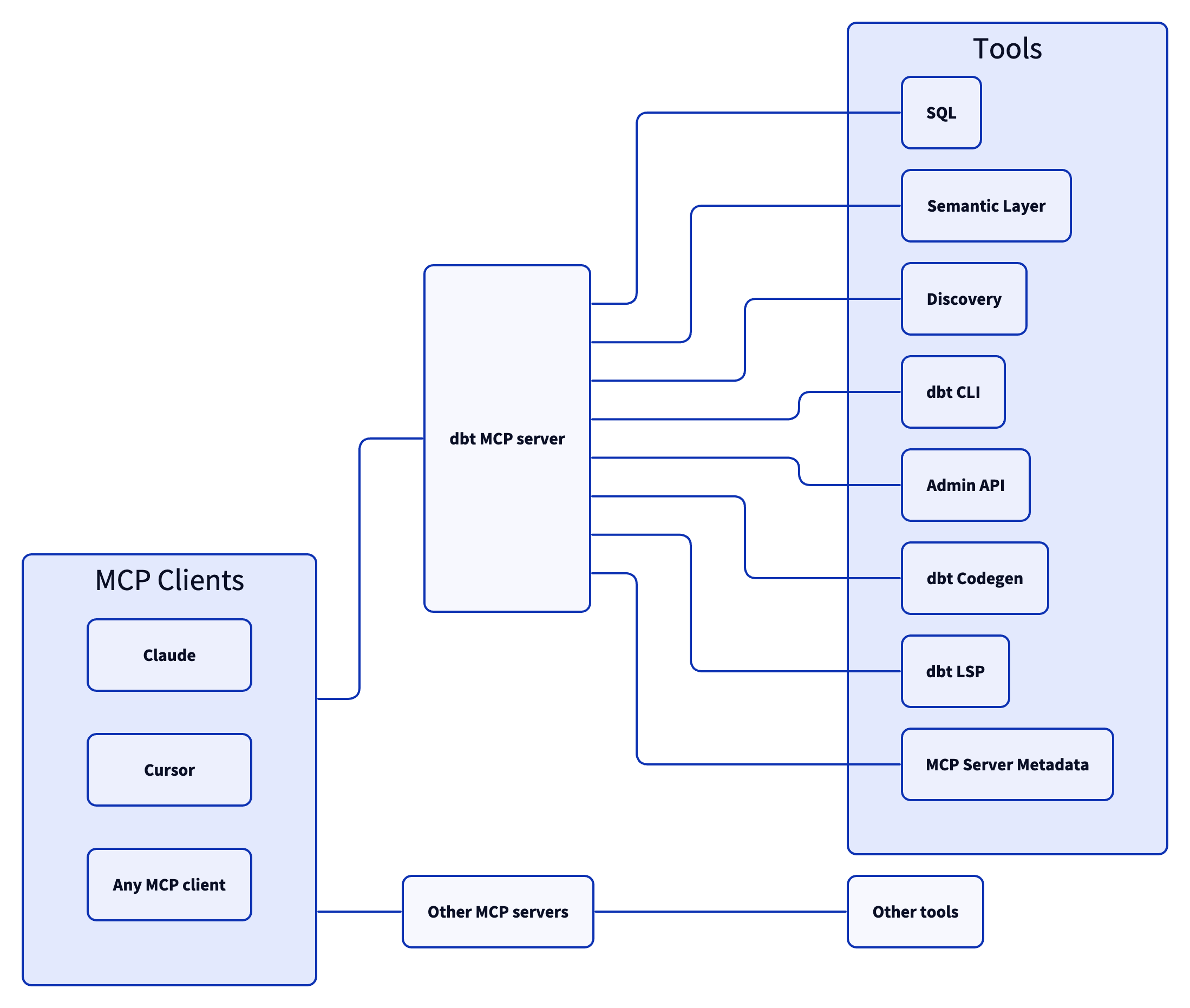
Architecture
Setup
- Install uv
- Copy the
.env.examplefile locally under a file called.envand set it with your specific environment variables (see theConfigurationsection of theREADME.md)
Configuration
The MCP server takes the following environment variable configuration:
Tool Groups
| Name | Default | Description |
|---|---|---|
DISABLE_DBT_CLI | false | Set this to true to disable dbt Core and dbt Cloud CLI MCP tools |
DISABLE_SEMANTIC_LAYER | false | Set this to true to disable dbt Semantic Layer MCP objects |
DISABLE_DISCOVERY | false | Set this to true to disable dbt Discovery API MCP objects |
DISABLE_REMOTE | true | Set this to false to enable remote MCP objects |
Configuration for Discovery, Semantic Layer, and Remote Tools
| Name | Default | Description |
|---|---|---|
DBT_HOST | cloud.getdbt.com | Your dbt Cloud instance hostname. This will look like an Access URL found here. If you are using Multi-cell, do not include the ACCOUNT_PREFIX here |
MULTICELL_ACCOUNT_PREFIX | - | If you are using Multi-cell, set this to your ACCOUNT_PREFIX. If you are not using Multi-cell, do not set this environment variable. You can learn more here |
DBT_TOKEN | - | Your personal access token or service token. Note: a service token is required when using the Semantic Layer and this service token should have at least Semantic Layer Only, Metadata Only, and Developer permissions. |
DBT_PROD_ENV_ID | - | Your dbt Cloud production environment ID |
Configuration for Remote Tools
| Name | Description |
|---|---|
DBT_DEV_ENV_ID | Your dbt Cloud development environment ID |
DBT_USER_ID | Your dbt Cloud user ID |
Configuration for dbt CLI
| Name | Description |
|---|---|
DBT_PROJECT_DIR | The path to where the repository of your dbt Project is hosted locally. This should look something like /Users/firstnamelastname/reponame |
DBT_PATH | The path to your dbt Core or dbt Cloud CLI executable. You can find your dbt executable by running which dbt |
Using with MCP Clients
After going through Installation, you can use your server with an MCP client.
This configuration will be added to the respective client's config file. Be sure to replace the sections within <>:
{
  "mcpServers": {
    "dbt-mcp": {
      "command": "uvx",
      "args": [
        "--env-file",
        "<path-to-.env-file>",
        "dbt-mcp"
      ]
    },
  }
}
<path-to-.env-file> is where you saved the .env file from the Setup step
Claude Desktop
Follow these instructions to create the claude_desktop_config.json file and connect.
You can find the Claude Desktop logs at ~/Library/Logs/Claude for Mac or %APPDATA%\Claude\logs for Windows.
Cursor
- Open the Cursor menu and select Settings → Cursor Settings → MCP
- Click "Add new global MCP server"
- Add the config from above to the provided
mcp.jsonfile - Verify your connection is active within the MCP tab
Cursor MCP docs here for reference
VS Code
-
Open the Settings menu (Command + Comma) and select the correct tab atop the page for your use case
Workspace- configures the server in the context of your workspaceUser- configures the server in the context of your user- Note for WSL users: If you're using VS Code with WSL, you'll need to configure WSL-specific settings. Run the Preferences: Open Remote Settings command from the Command Palette (F1) or select the Remote tab in the Settings editor. Local User settings are reused in WSL but can be overridden with WSL-specific settings. Configuring MCP servers in the local User settings will not work properly in a WSL environment.
-
Select Features → Chat
-
Ensure that "Mcp" is
Enabled
-
Click "Edit in settings.json" under "Mcp > Discovery"
-
Add your server configuration (
dbt) to the providedsettings.jsonfile as one of the servers:
{
    "mcp": {
        "inputs": [],
        "servers": {
          "dbt": {
            "command": "uvx",
            "args": [
              "--env-file",
              "<path-to-.env-file>",
              "dbt-mcp"
            ]
          },
        }
    }
}
<path-to-.env-file> is where you saved the .env file from the Setup step
- You can start, stop, and configure your MCP servers by:
- Running the
MCP: List Serverscommand from the Command Palette (Control + Command + P) and selecting the server - Utlizing the keywords inline within the
settings.jsonfile
VS Code MCP docs here for reference
Tools
dbt CLI
build- Executes models, tests, snapshots, and seeds in dependency ordercompile- Generates executable SQL from models, tests, and analyses without running themdocs- Generates documentation for the dbt projectls(list) - Lists resources in the dbt project, such as models and testsparse- Parses and validates the project’s files for syntax correctnessrun- Executes models to materialize them in the databasetest- Runs tests to validate data and model integrityshow- Runs a query against the data warehouse
Allowing your client to utilize dbt commands through this MCP tooling could modify your data models, sources, and warehouse objects. Proceed only if you trust the client and understand the potential impact.
Semantic Layer
list_metrics- Retrieves all defined metricsget_dimensions- Gets dimensions associated with specified metricsget_entities- Gets entities associated with specified metricsquery_metrics- Queries metrics with optional grouping, ordering, filtering, and limiting
Discovery
get_mart_models- Gets all mart modelsget_all_models- Gets all modelsget_model_details- Gets details for a specific modelget_model_parents- Gets parent nodes of a specific modelget_model_children- Gets children modes of a specific model
Remote
text_to_sql- Generate SQL from natural language requestsexecute_sql- Execute SQL on dbt Cloud's backend infrastructure with support for Semantic Layer SQL syntax.
Contributing
Read CONTRIBUTING.md for instructions on how to get involved!