Dicloak Local Api Mcp Bridge
DICloak MCP Server
Welcome to use Dicloak MCP Server! This tool enables you to directly invoke the powerful functions of Dicloak client's Local API through natural language in the GPT client.
What You Can Do
With DICloak MCP Server, you can:
- Manage your environment - Create, update, delete and list your environment information
- Manage your groups - Query, create, delete groups, or create your own groups
- Manage your proxy server - Query the list of proxies, and the most important thing is to detect new proxy information.
- Manage your members - Dynamic management of member permissions, creation of new members
- Social media automation - Rich automation of social media traffic, including TikTok, YouTube, Amazon, etc.
Example Use Cases
- "Check how many environments I have now?"
- "Open the environment named "my-env-1""
- "Help me check this proxy information: Some proxy information"
- "Use my TikTok environment to boost the activity of my account, and automatically help me browse the videos on the homepage and give them likes."
- "Go to YouTube and help me post a new update there, using my local video."
Setup for MCP Clients
Claude Desktop
How to connect DICloak MCP with Claude Desktop:
Step 1: Access Claude Desktop settings
Open your Claude Desktop application. In the top menu bar, click on 'Claude' and then select 'Settings...'.
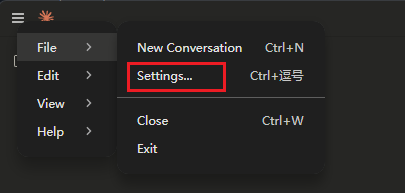
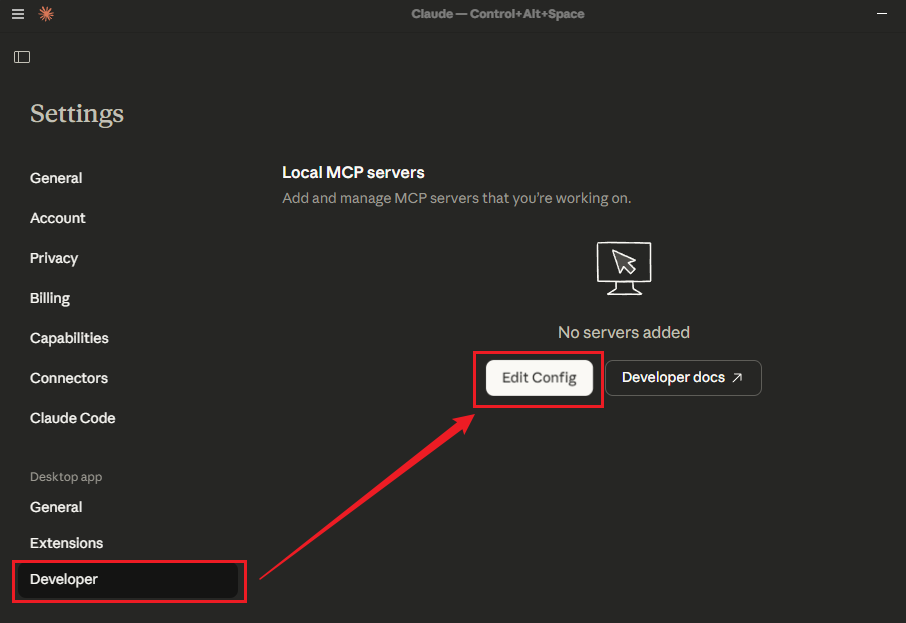
Step 2: Navigate to developer settings
In the Settings, click on Developer on the left side, and then click Edit Config to open the json configuration file.
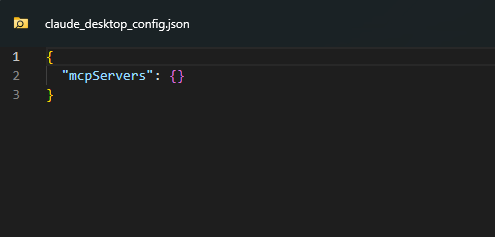
Step 3: Locate claude_desktop_config.json
You are configuring the MCP server in this file. Usually, the system will use the default text editor to open the "claude_desktop_config.json" file.
Step 4: Add DICloak MCP configuration
You need to add the DICloak MCP server configuration details within the mcpservers object. Carefully paste the following JSON snippet into your claude_desktop_config.json file. Important Note: Replace "DICLOAK_API_KEY" and "DICLOAK_BASE_URL" with your actual DICloak Local API token and request address.
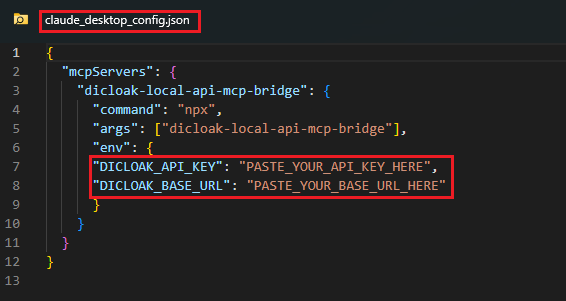
{
  "mcpServers": {
    "dicloak-local-api-mcp-bridge": {
      "command": "npx",
      "args": ["dicloak-local-api-mcp-bridge"],
      "env": {
      "DICLOAK_API_KEY": "PASTE_YOUR_API_KEY_HERE",
      "DICLOAK_BASE_URL": "PASTE_YOUR_BASE_URL_HERE"
      }
    }
  }
}
Step 5: Verify connection in connectors
After saving the claude_desktop_config.json file, it is recommended to restart Claude Desktop to ensure the new configuration is loaded. Once Claude restarts, navigate back to its 'Settings'. Under the 'Connectors' section (which might be under 'General' or 'Extensions' depending on your Claude version), you should now see 'dicloak-local-api-mcp-bridge LOCAL' listed as a connected service. This indicates a successful integration.


Congratulations! You have successfully connected DICloak MCP with Claude Desktop. Your AI assistant can now leverage DICloak profiles for various tasks.
Cursor
-
Configure in Cursor:
Add to your Cursor MCP configuration:
{
  "mcpServers": {
    "dicloak-local-api-mcp-bridge": {
      "command": "npx",
      "args": ["dicloak-local-api-mcp-bridge"],
      "env": {
         "DICLOAK_API_KEY": "PASTE_YOUR_API_KEY_HERE",
         "DICLOAK_BASE_URL": "PASTE_YOUR_BASE_URL_HERE"
      }
    }
  }
}
Other MCP Clients
For other MCP-compatible clients, use the same configuration pattern with the appropriate config file location for your client.
Getting Your API Token
- Log in to your DICloak account
- Go to OpenApi Setting
- Generate or copy your API token and API address
- Use this token in the configuration above
Important Note: Please append "/openapi" after the copied API address. This is mandatory.