Rails AI Context — Zero-config MCP server for Rails apps
rails-ai-context
Turn any Rails app into an AI-ready codebase — one gem install.




Built by a Rails dev who got tired of burning tokens explaining his app to AI assistants every single session.
The Problem
You open Claude Code, Cursor, or Copilot and ask: "Add a draft status to posts with a scheduled publish date."
The AI doesn't know your schema, your Devise setup, your Sidekiq jobs, or that Post already has an enum :status. It generates generic code that doesn't match your app.
rails-ai-context fixes this. It auto-introspects your entire Rails app and feeds everything to your AI assistant — schema, models, routes, controllers, jobs, gems, auth, API, tests, config, and conventions — through the Model Context Protocol (MCP).
Proof: 37% Token Savings (Real Benchmark)
Same task — "Add status and date range filters to the Cooks index page" — 4 scenarios in parallel, same Rails app:
| Setup | Tokens | Saved | What it knows |
|---|---|---|---|
| rails-ai-context (full) | 28,834 | 37% | 13 MCP tools + generated docs + rules |
| rails-ai-context CLAUDE.md only | 33,106 | 27% | Generated docs + rules, no MCP tools |
Normal Claude /init | 40,700 | 11% | Generic CLAUDE.md only |
| No rails-ai-context at all | 45,477 | baseline | Nothing — discovers everything from scratch |
No rails-ai-context          45,477 tk  █████████████████████████████████████████████
Normal Claude /init           40,700 tk  █████████████████████████████████████████     -11%
rails-ai-context CLAUDE.md    33,106 tk  █████████████████████████████████             -27%
rails-ai-context (full)       28,834 tk  █████████████████████████████                 -37%
https://github.com/user-attachments/assets/14476243-1210-4e62-9dc5-9d4aa9caef7e
What each layer gives you:
Normal /init | rails-ai-context CLAUDE.md | rails-ai-context full | |
|---|---|---|---|
| Knows it's Rails + Tailwind | Yes | Yes | Yes |
| Knows model names, columns, associations | No | Yes | Yes |
| Knows controller actions, filters | No | Yes | Yes |
| Discovery overhead | ~8 calls | 0 calls | 0 calls |
| Structured MCP queries | No | No | Yes — 5 MCP calls replace file reads |
~16,600 fewer tokens per task vs no gem at all.
This was a simple task on a small 5-model app. Real-world tasks are 3-10x more complex. A feature touching auth + payments + mailers + tests on a 50-model app? Without the gem, Claude reads
db/schema.rb(2,000+ lines), every model file, every controller, every view — easily 200K+ tokens per session. With rails-ai-context, MCP tools return only what's needed:rails_get_schema(table:"users")returns 25 lines instead of 2,000. The bigger your app and the harder the task, the more you save.
| App size | Without gem | With rails-ai-context | Savings |
|---|---|---|---|
| Small (5 models) | 45K tokens | 29K tokens | 37% |
| Medium (30 models) | ~150K tokens | ~60K tokens | ~60% |
| Large (100+ models) | ~500K+ tokens | ~100K tokens | ~80% |
Medium/large estimates based on schema.rb scaling (40 lines/table), model file scaling, and MCP summary-first workflow eliminating full-file reads.
Quick Start
bundle add rails-ai-context
rails generate rails_ai_context:install
rails ai:context
That's it. Three commands. Your AI assistant now understands your entire Rails app.
The install generator creates .mcp.json for auto-discovery — Claude Code and Cursor detect it automatically. No manual MCP config needed.
Full Guide — complete documentation with every command, parameter, and configuration option.
How It Saves Tokens
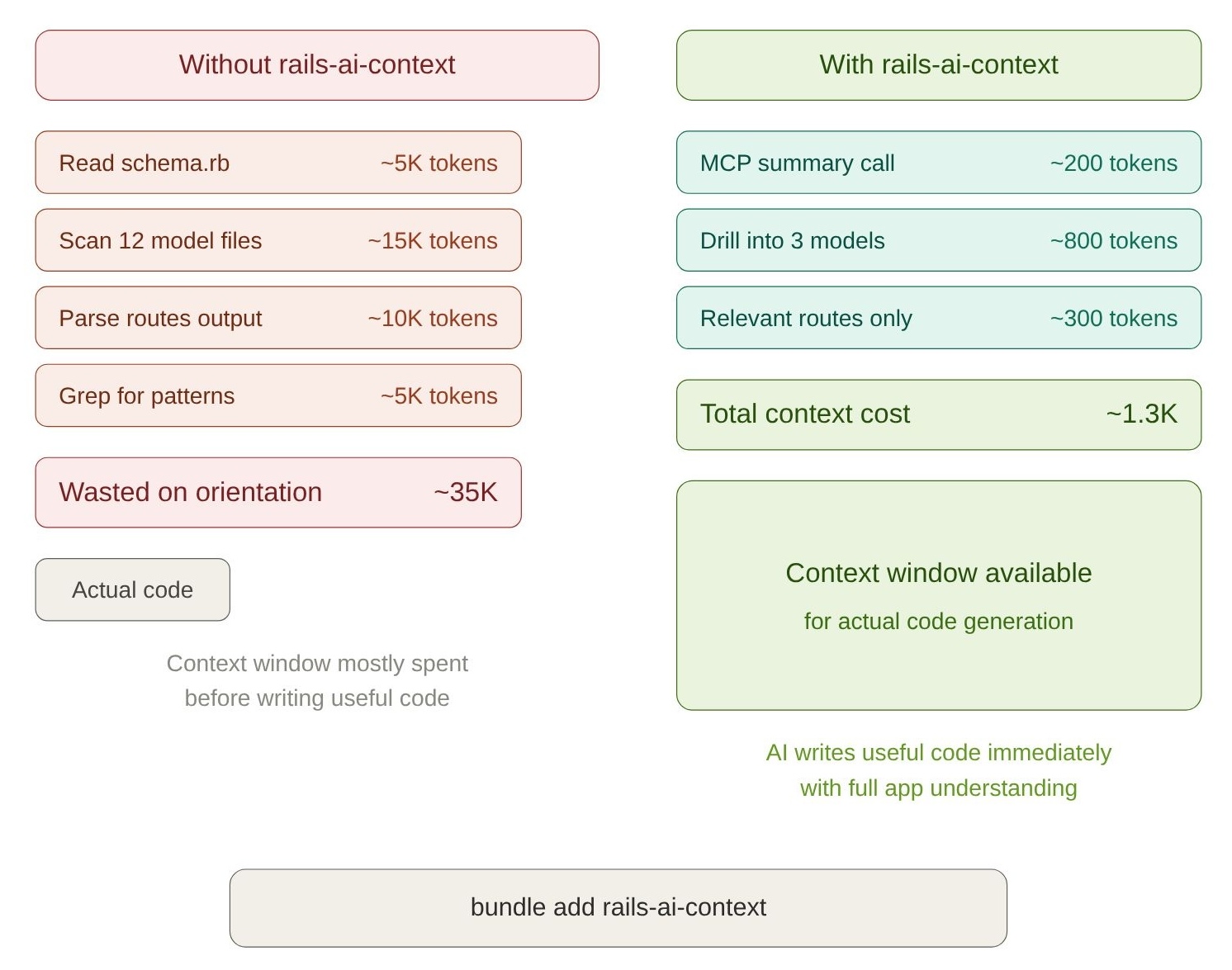
/initsaves 11% — knows the framework but wastes tokens discovering models and tables- CLAUDE.md saves 27% — complete Rails-specific map, zero discovery overhead
- Full MCP saves 37% — structured queries replace expensive full-file reads
- MCP tools return
detail:"summary"first (~55 tokens), then drill into specifics - Split rule files only activate in relevant directories
13 Live MCP Tools
The gem exposes 13 read-only tools via MCP that AI clients call on-demand:
| Tool | What it returns |
|---|---|
rails_get_schema | Tables, columns, indexes, foreign keys |
rails_get_model_details | Associations, validations, scopes, enums, callbacks |
rails_get_routes | HTTP verbs, paths, controller actions |
rails_get_controllers | Actions, filters, strong params, concerns |
rails_get_config | Cache, session, timezone, middleware, initializers |
rails_get_test_info | Test framework, factories, CI config, coverage |
rails_get_gems | Notable gems categorized by function |
rails_get_conventions | Architecture patterns, directory structure |
rails_search_code | Ripgrep-powered regex search across the codebase |
rails_get_view | View templates, partials, Stimulus references |
rails_get_stimulus | Stimulus controllers — targets, values, actions, outlets |
rails_get_edit_context | Surgical edit helper — returns code around a match with line numbers |
rails_validate | Batch syntax validation for Ruby, ERB, and JavaScript files |
Smart Detail Levels
Schema, routes, models, and controllers tools support a detail parameter — critical for large apps:
| Level | Returns | Default limit |
|---|---|---|
summary | Names + counts | 50 |
standard | Names + key details (default) | 15 |
full | Everything (indexes, FKs, constraints) | 5 |
rails_get_schema(detail: "summary")           # → all tables with column counts
rails_get_schema(table: "users")              # → full detail for one table
rails_get_routes(controller: "users")         # → routes for one controller
rails_get_model_details(model: "User")        # → associations, validations, scopes
A safety net (max_tool_response_chars, default 120K) truncates oversized responses with hints to use filters.
What Gets Generated
rails ai:context generates context files tailored to each AI assistant:
your-rails-app/
│
├── 🟣 Claude Code
│   ├── CLAUDE.md                                         ≤150 lines (compact)
│   └── .claude/rules/
│       ├── rails-context.md                              app overview
│       ├── rails-schema.md                               table listing + column types
│       ├── rails-models.md                               model listing
│       ├── rails-ui-patterns.md                          CSS/Tailwind component patterns
│       └── rails-mcp-tools.md                            full tool reference
│
├── 🟢 Cursor
│   └── .cursor/rules/
│       ├── rails-project.mdc                             alwaysApply: true
│       ├── rails-models.mdc                              globs: app/models/**
│       ├── rails-controllers.mdc                         globs: app/controllers/**
│       ├── rails-ui-patterns.mdc                         globs: app/views/**
│       └── rails-mcp-tools.mdc                           alwaysApply: true
│
├── ⚡ OpenCode
│   ├── AGENTS.md                                        native OpenCode context
│   ├── app/models/AGENTS.md                             auto-loaded when editing models
│   └── app/controllers/AGENTS.md                        auto-loaded when editing controllers
│
├── 🔵 Windsurf
│   ├── .windsurfrules                                    ≤5,800 chars (6K limit)
│   └── .windsurf/rules/
│       ├── rails-context.md                              project overview
│       ├── rails-ui-patterns.md                          CSS component patterns
│       └── rails-mcp-tools.md                            tool reference
│
├── 🟠 GitHub Copilot
│   ├── .github/copilot-instructions.md                   ≤500 lines (compact)
│   └── .github/instructions/
│       ├── rails-context.instructions.md                 applyTo: **/*
│       ├── rails-models.instructions.md                  applyTo: app/models/**
│       ├── rails-controllers.instructions.md             applyTo: app/controllers/**
│       ├── rails-ui-patterns.instructions.md             applyTo: app/views/**
│       └── rails-mcp-tools.instructions.md               applyTo: **/*
│
├── 📋 .ai-context.json                                   full JSON (programmatic)
└── .mcp.json                                             MCP auto-discovery
Root files (CLAUDE.md, AGENTS.md, etc.) use section markers — your custom content outside the markers is preserved on re-generation. Set config.generate_root_files = false to only generate split rules.
What Your AI Learns
| Category | What's introspected |
|---|---|
| Database | Every table, column, index, foreign key, and migration |
| Models | Associations, validations, scopes, enums, callbacks, concerns, macros |
| Routing | Every route with HTTP verbs, paths, controller actions, API namespaces |
| Controllers | Actions, filters, strong params, concerns, API controllers |
| Views | Layouts, templates, partials, helpers, template engines, view components |
| Frontend | Stimulus controllers (targets, values, actions, outlets), Turbo Frames/Streams |
| Background | ActiveJob classes, mailers, Action Cable channels |
| Gems | 70+ notable gems categorized (Devise = auth, Sidekiq = jobs, Pundit = authorization) |
| Auth | Devise modules, Pundit policies, CanCanCan, has_secure_password, CORS, CSP |
| API | Serializers, GraphQL, versioning, rate limiting, API-only mode |
| Testing | Framework, factories/fixtures, CI config, coverage, system tests |
| Config | Cache store, session store, middleware, initializers, timezone |
| DevOps | Puma, Procfile, Docker, deployment tools, asset pipeline |
| Architecture | Service objects, STI, polymorphism, state machines, multi-tenancy, engines |
29 introspectors total. The :standard preset runs 13 core ones by default; use :full for 28 (database_stats is opt-in, PostgreSQL only).
MCP Server Setup
The install generator creates .mcp.json — Claude Code and Cursor auto-detect it. No manual config needed.
This server is also listed on the official MCP Registry as io.github.crisnahine/rails-ai-context.
To start manually: rails ai:serve
Claude Desktop setup
Add to ~/Library/Application Support/Claude/claude_desktop_config.json (macOS):
{
  "mcpServers": {
    "rails-ai-context": {
      "command": "bundle",
      "args": ["exec", "rails", "ai:serve"],
      "cwd": "/path/to/your/rails/app"
    }
  }
}
HTTP transport (for remote clients)
rails ai:serve_http # Starts at http://127.0.0.1:6029/mcp
Or auto-mount inside your Rails app:
RailsAiContext.configure do |config|
  config.auto_mount = true
  config.http_path  = "/mcp"
end
Configuration
# config/initializers/rails_ai_context.rb
RailsAiContext.configure do |config|
  # Presets: :standard (13 introspectors, default) or :full (all 28)
  config.preset = :standard

  # Cherry-pick on top of a preset
  # config.introspectors += %i[views turbo auth api]

  # Context mode: :compact (≤150 lines, default) or :full (dump everything)
  # config.context_mode = :compact

  # Exclude models from introspection
  config.excluded_models += %w[AdminUser InternalAuditLog]

  # Exclude paths from code search
  config.excluded_paths += %w[vendor/bundle]

  # Cache TTL for MCP tool responses (seconds)
  config.cache_ttl = 30

  # Live reload: auto-invalidate MCP caches on file changes
  # :auto (default), true, or false
  # config.live_reload = :auto

  # Skip root files (CLAUDE.md, .windsurfrules, etc.) — only generate split rules
  # Lets you manage root files yourself while still getting .claude/rules/, .cursor/rules/, etc.
  # config.generate_root_files = false
end
All configuration options
| Option | Default | Description |
|---|---|---|
preset | :standard | Introspector preset (:standard or :full) |
introspectors | 13 core | Array of introspector symbols |
context_mode | :compact | :compact (≤150 lines) or :full (dump everything) |
claude_max_lines | 150 | Max lines for CLAUDE.md in compact mode |
max_tool_response_chars | 120_000 | Safety cap for MCP tool responses |
excluded_models | internal Rails models | Models to skip during introspection |
excluded_paths | node_modules tmp log vendor .git | Paths excluded from code search |
auto_mount | false | Auto-mount HTTP MCP endpoint |
http_path | "/mcp" | HTTP endpoint path |
http_port | 6029 | HTTP server port |
cache_ttl | 30 | Cache TTL in seconds |
live_reload | :auto | :auto, true, or false — MCP live reload |
live_reload_debounce | 1.5 | Debounce interval in seconds |
generate_root_files | true | Generate root files (CLAUDE.md, etc.) — set false for split rules only |
Commands
Rake tasks (recommended)
| Command | Description |
|---|---|
rails ai:context | Generate all context files (skips unchanged) |
rails ai:context:full | Generate all files in full mode (dumps everything) |
rails ai:context:claude | Generate Claude Code files only |
rails ai:context:opencode | Generate OpenCode files only |
rails ai:context:cursor | Generate Cursor files only |
rails ai:context:windsurf | Generate Windsurf files only |
rails ai:context:copilot | Generate Copilot files only |
rails ai:serve | Start MCP server (stdio) |
rails ai:serve_http | Start MCP server (HTTP) |
rails ai:doctor | Run diagnostics and AI readiness score (0-100) |
rails ai:watch | Auto-regenerate context files on code changes |
rails ai:inspect | Print introspection summary to stdout |
Standalone CLI
The gem also ships a rails-ai-context executable — an alternative to rake tasks.
| Command | Equivalent rake task |
|---|---|
rails-ai-context serve | rails ai:serve |
rails-ai-context serve --transport http | rails ai:serve_http |
rails-ai-context context | rails ai:context |
rails-ai-context context --format claude | rails ai:context:claude |
rails-ai-context doctor | rails ai:doctor |
rails-ai-context watch | rails ai:watch |
rails-ai-context inspect | rails ai:inspect |
rails-ai-context version | — |
Run from your Rails app root. Use rails-ai-context help for all options.
Stack Compatibility
Works with every Rails architecture — auto-detects what's relevant:
| Setup | Coverage | Notes |
|---|---|---|
| Rails full-stack (ERB + Hotwire) | 29/29 | All introspectors relevant |
| Rails + Inertia.js (React/Vue) | ~22/29 | Views/Turbo partially useful, backend fully covered |
| Rails API + React/Next.js SPA | ~20/29 | Schema, models, routes, API, auth, jobs — all covered |
| Rails API + mobile app | ~20/29 | Same as SPA — backend introspection is identical |
| Rails engine (mountable gem) | ~15/29 | Core introspectors (schema, models, routes, gems) work |
Frontend introspectors (views, Turbo, Stimulus, assets) degrade gracefully — they report nothing when those features aren't present.
Works Without a Database
The gem parses db/schema.rb as text when no database is connected. Works in CI, Docker build stages, and Claude Code sessions without a running DB.
Requirements
- Ruby >= 3.2, Rails >= 7.1
- mcp gem (installed automatically)
- Optional:
listengem for watch mode,ripgrepfor fast code search
vs. Other Ruby MCP Projects
| Project | Approach | rails-ai-context |
|---|---|---|
| Official Ruby SDK | Low-level protocol library | We use this as our foundation |
| fast-mcp | Generic MCP framework | We're a product — zero-config Rails introspection |
| rails-mcp-server | Manual config (projects.yml) | We auto-discover everything |
Contributing
git clone https://github.com/crisnahine/rails-ai-context.git
cd rails-ai-context && bundle install
bundle exec rspec       # 491 examples
bundle exec rubocop     # Lint
Bug reports and pull requests welcome at github.com/crisnahine/rails-ai-context.
Sponsorship
If rails-ai-context helps your workflow, consider becoming a sponsor.
License
Server Config
{
  "mcpServers": {
    "rails-ai-context": {
      "command": "bundle",
      "args": [
        "exec",
        "rails",
        "ai:serve"
      ]
    }
  }
}