MCP Server for Asana
MCP Server for Asana

This Model Context Protocol server implementation of Asana allows you to talk to Asana API from MCP Client such as Anthropic's Claude Desktop Application, and many more.
More details on MCP here:
- https://www.anthropic.com/news/model-context-protocol
- https://modelcontextprotocol.io/introduction
- https://github.com/modelcontextprotocol
Usage
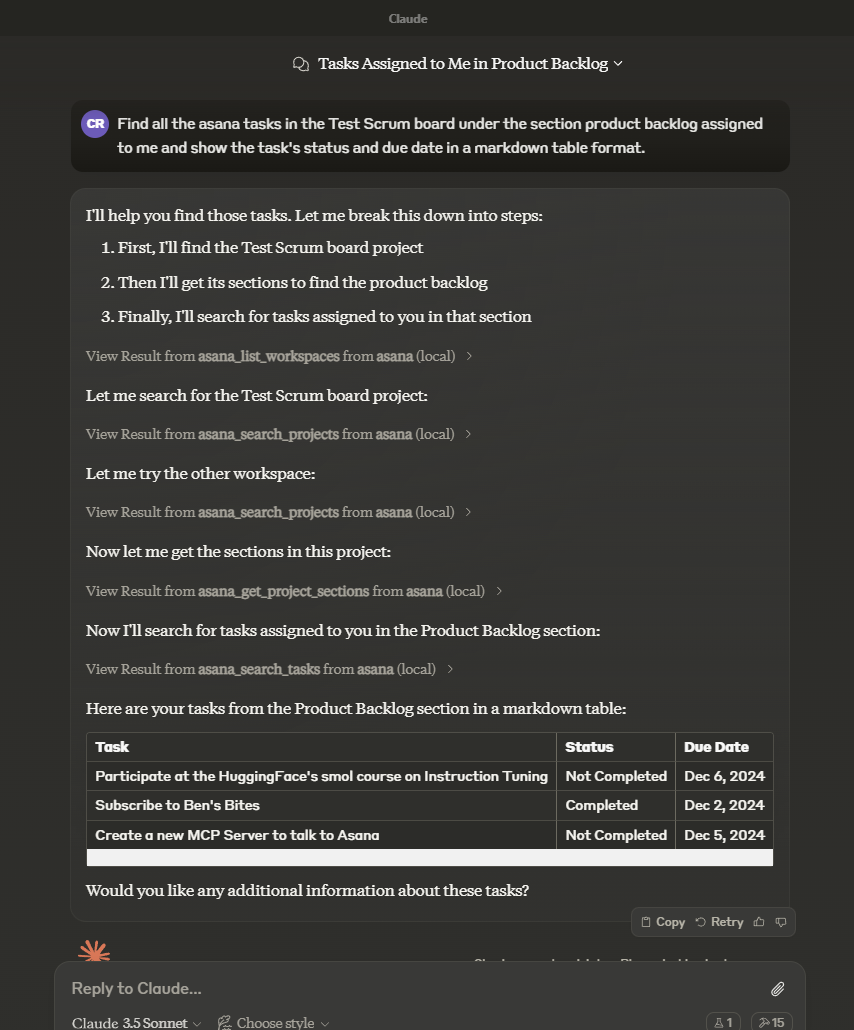
In the AI toold of your choice (ex: Claude Desktop) ask something about asana tasks, projects, workspaces, and/or comments. Mentioning the word "asana" will increase the chance of having the LLM pick the right tool.
Example:
How many unfinished asana tasks do we have in our Sprint 30 project?
Another example:
Tools
asana_list_workspaces- List all available workspaces in Asana
- Optional input:
- opt_fields (string): Comma-separated list of optional fields to include
- Returns: List of workspaces
asana_search_projects- Search for projects in Asana using name pattern matching
- Required input:
- workspace (string): The workspace to search in
- name_pattern (string): Regular expression pattern to match project names
- Optional input:
- archived (boolean): Only return archived projects (default: false)
- opt_fields (string): Comma-separated list of optional fields to include
- Returns: List of matching projects
asana_search_tasks- Search tasks in a workspace with advanced filtering options
- Required input:
- workspace (string): The workspace to search in
- Optional input:
- text (string): Text to search for in task names and descriptions
- resource_subtype (string): Filter by task subtype (e.g. milestone)
- completed (boolean): Filter for completed tasks
- is_subtask (boolean): Filter for subtasks
- has_attachment (boolean): Filter for tasks with attachments
- is_blocked (boolean): Filter for tasks with incomplete dependencies
- is_blocking (boolean): Filter for incomplete tasks with dependents
- assignee, projects, sections, tags, teams, and many other advanced filters
- sort_by (string): Sort by due_date, created_at, completed_at, likes, modified_at (default: modified_at)
- sort_ascending (boolean): Sort in ascending order (default: false)
- opt_fields (string): Comma-separated list of optional fields to include
- Returns: List of matching tasks
asana_get_task- Get detailed information about a specific task
- Required input:
- task_id (string): The task ID to retrieve
- Optional input:
- opt_fields (string): Comma-separated list of optional fields to include
- Returns: Detailed task information
asana_create_task- Create a new task in a project
- Required input:
- project_id (string): The project to create the task in
- name (string): Name of the task
- Optional input:
- notes (string): Description of the task
- due_on (string): Due date in YYYY-MM-DD format
- assignee (string): Assignee (can be 'me' or a user ID)
- Returns: Created task information
asana_get_task_stories- Get comments and stories for a specific task
- Required input:
- task_id (string): The task ID to get stories for
- Optional input:
- opt_fields (string): Comma-separated list of optional fields to include
- Returns: List of task stories/comments
asana_update_task- Update an existing task's details
- Required input:
- task_id (string): The task ID to update
- Optional input:
- name (string): New name for the task
- notes (string): New description for the task
- due_on (string): New due date in YYYY-MM-DD format
- assignee (string): New assignee (can be 'me' or a user ID)
- completed (boolean): Mark task as completed or not
- Returns: Updated task information
asana_get_project- Get detailed information about a specific project
- Required input:
- project_id (string): The project ID to retrieve
- Optional input:
- opt_fields (string): Comma-separated list of optional fields to include
- Returns: Detailed project information
asana_get_project_task_counts- Get the number of tasks in a project
- Required input:
- project_id (string): The project ID to get task counts for
- Optional input:
- opt_fields (string): Comma-separated list of optional fields to include
- Returns: Task count information
asana_get_project_sections- Get sections in a project
- Required input:
- project_id (string): The project ID to get sections for
- Optional input:
- opt_fields (string): Comma-separated list of optional fields to include
- Returns: List of project sections
asana_create_task_story- Create a comment or story on a task
- Required input:
- task_id (string): The task ID to add the story to
- text (string): The text content of the story/comment
- Optional input:
- opt_fields (string): Comma-separated list of optional fields to include
- Returns: Created story information
asana_add_task_dependencies- Set dependencies for a task
- Required input:
- task_id (string): The task ID to add dependencies to
- dependencies (array of strings): Array of task IDs that this task depends on
- Returns: Updated task dependencies
asana_add_task_dependents- Set dependents for a task (tasks that depend on this task)
- Required input:
- task_id (string): The task ID to add dependents to
- dependents (array of strings): Array of task IDs that depend on this task
- Returns: Updated task dependents
asana_create_subtask- Create a new subtask for an existing task
- Required input:
- parent_task_id (string): The parent task ID to create the subtask under
- name (string): Name of the subtask
- Optional input:
- notes (string): Description of the subtask
- due_on (string): Due date in YYYY-MM-DD format
- assignee (string): Assignee (can be 'me' or a user ID)
- opt_fields (string): Comma-separated list of optional fields to include
- Returns: Created subtask information
asana_get_multiple_tasks_by_gid- Get detailed information about multiple tasks by their GIDs (maximum 25 tasks)
- Required input:
- task_ids (array of strings or comma-separated string): Task GIDs to retrieve (max 25)
- Optional input:
- opt_fields (string): Comma-separated list of optional fields to include
- Returns: List of detailed task information
Prompts
task-summary- Get a summary and status update for a task based on its notes, custom fields and comments
- Required input:
- task_id (string): The task ID to get summary for
- Returns: A detailed prompt with instructions for generating a task summary
Resources
None
Setup
-
Create an Asana account:
- Visit the Asana.
- Click "Sign up".
-
Retrieve the Asana Access Token:
- You can generate a personal access token from the Asana developer console.
- More details here: https://developers.asana.com/docs/personal-access-token
-
Configure Claude Desktop: Add the following to your
claude_desktop_config.json:{ "mcpServers": { "asana": { "command": "npx", "args": ["-y", "@roychri/mcp-server-asana"], "env": { "ASANA_ACCESS_TOKEN": "your-asana-access-token" } } } }
Troubleshooting
If you encounter permission errors:
- Ensure the asana plan you have allows API access
- Confirm the access token and configuration are correctly set in
claude_desktop_config.json.
Contributing
Clone this repo and start hacking.
Test it locally with the MCP Inspector
If you want to test your changes, you can use the MCP Inspector like this:
npm run inspector
This will expose the client to port 5173 and server to port 3000.
If those ports are already used by something else, you can use:
CLIENT_PORT=5009 SERVER_PORT=3009 npm run inspector
License
This MCP server is licensed under the MIT License. This means you are free to use, modify, and distribute the software, subject to the terms and conditions of the MIT License. For more details, please see the LICENSE file in the project repository.