Scrapeless Mcp Server
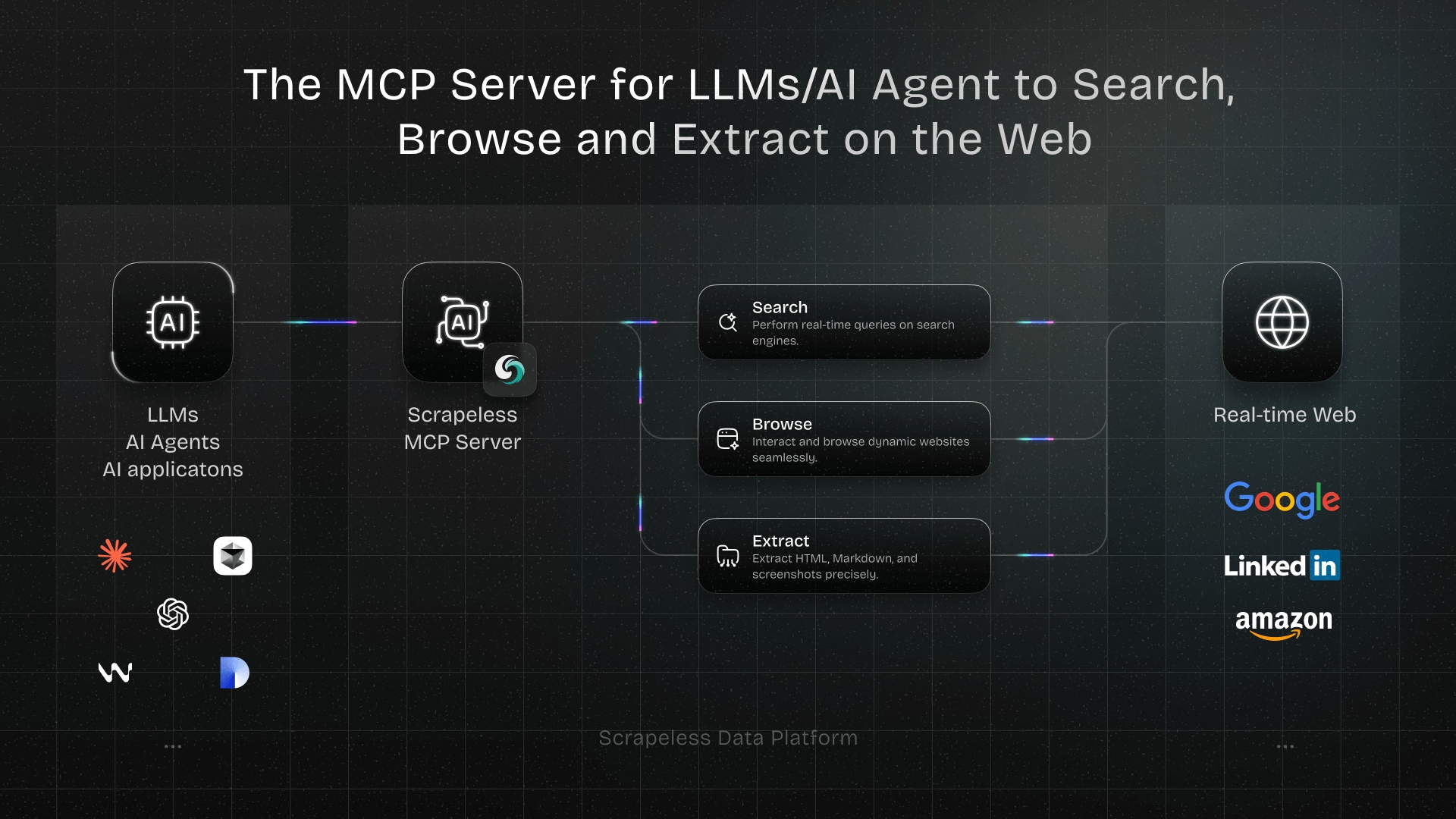
Scrapeless MCP Server
Welcome to the official Scrapeless Model Context Protocol (MCP) Server — a powerful integration layer that empowers LLMs, AI Agents, and AI applications to interact with the web in real time.
Built on the open MCP standard, Scrapeless MCP Server seamlessly connects models like ChatGPT, Claude, and tools like Cursor and Windsurf to a wide range of external capabilities, including:
- Google services integration (Search, Flights, Trends, Scholar, etc.)
- Browser automation for page-level navigation and interaction
- Scrape dynamic, JS-heavy sites—export as HTML, Markdown, or screenshots
Whether you're building an AI research assistant, a coding copilot, or autonomous web agents, this server provides the dynamic context and real-world data your workflows need—without getting blocked.
Usage Examples
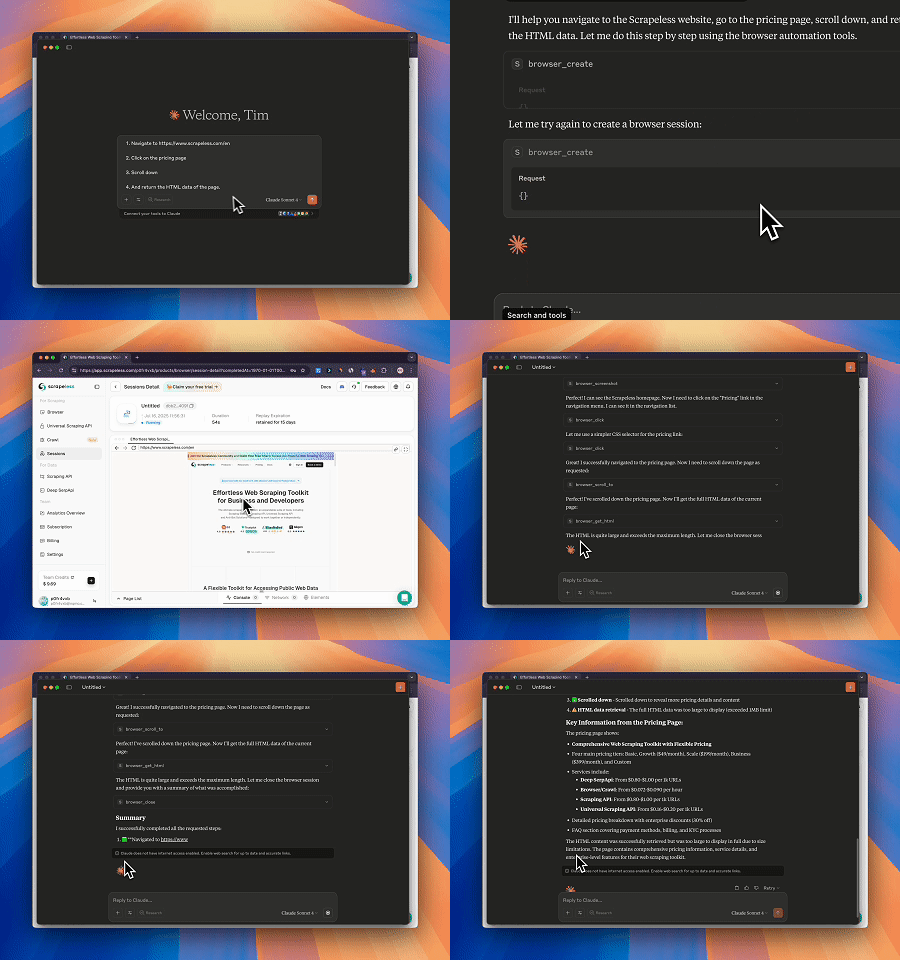
- Automated Web Interaction and Data Extraction with Claude
Using Scrapeless MCP Browser, Claude can perform complex tasks such as web navigation, clicking, scrolling, and scraping through conversational commands, with real-time preview of web interaction results via live sessions.
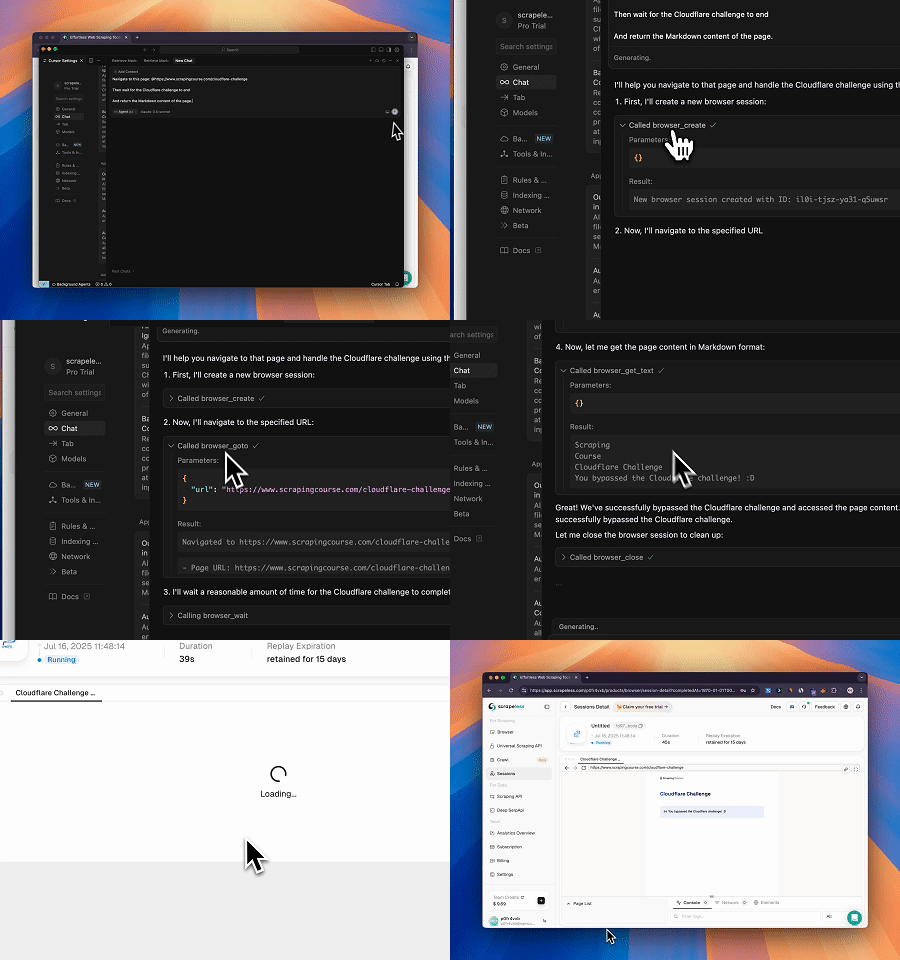
- Bypassing Cloudflare to Retrieve Target Page Content
Using the Scrapeless MCP Browser service, the Cloudflare page is automatically accessed, and after the process is completed, the page content is extracted and returned in Markdown format.
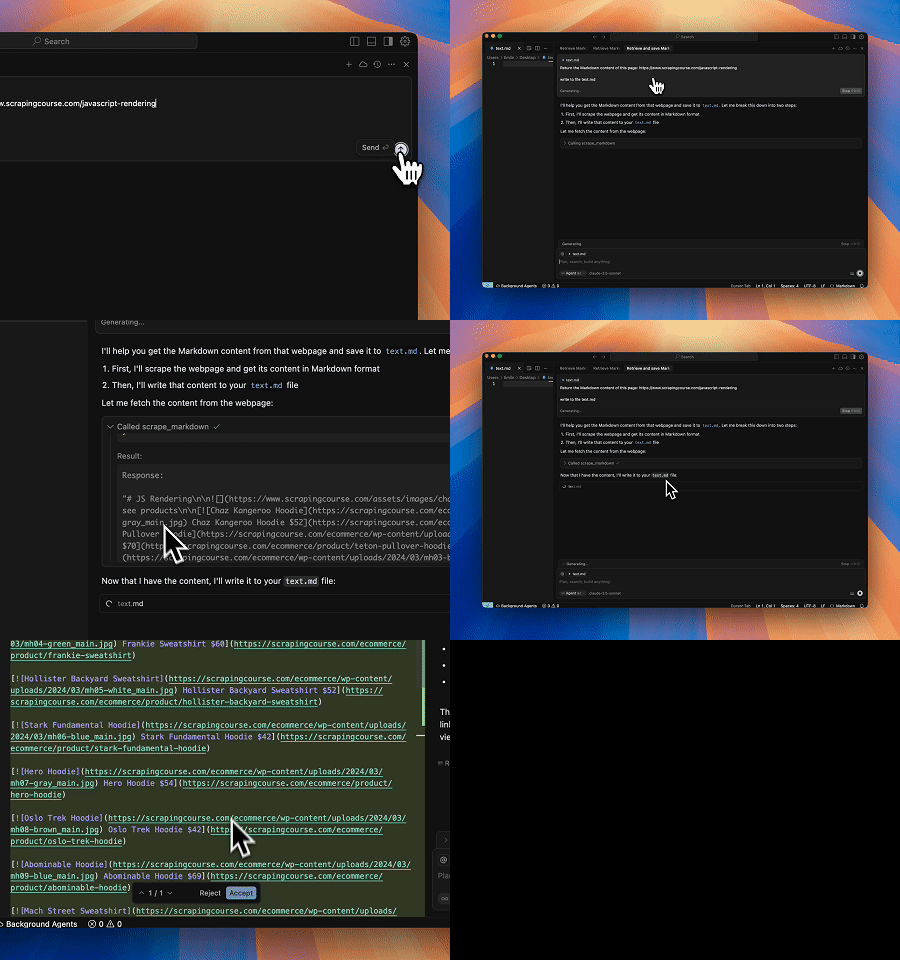
- Extracting Dynamically Rendered Page Content and Writing to File
Using the Scrapeless MCP Universal API, the JavaScript-rendered content of the target page above is scraped, exported in Markdown format, and finally written to a local file named text.md.
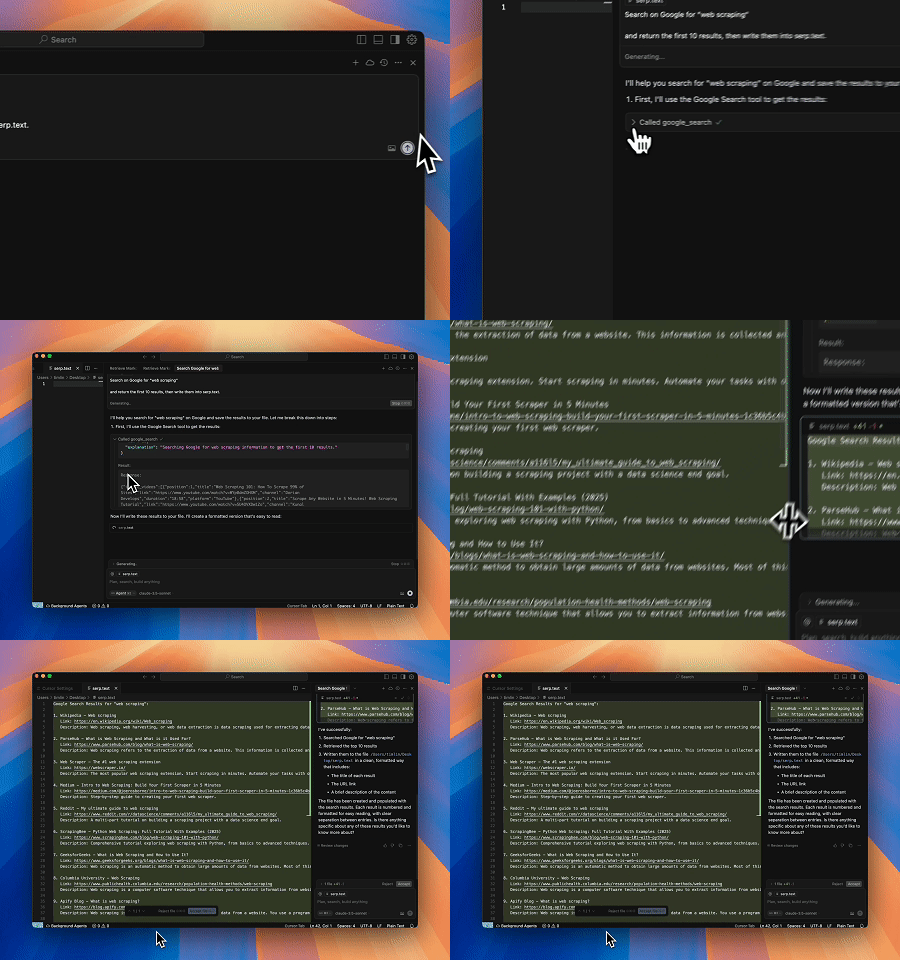
- Automated SERP Scraping
Using the Scrapeless MCP Server, query the keyword “web scraping” on Google Search, retrieve the first 10 search results (including title, link, and summary), and write the content to the file named serp.text.
Here are some additional examples of how to use these servers:
| Example |
|---|
| Please help me with my flight ticket from Chicago to New York on November 20, 2025. |
| Find papers by "Yoshua Bengio" on deep learning. |
| Search scrapeless by Google search. |
| Find the search interest for "AI" over the last year. |
| Use a browser to visit chatgpt.com, search for "What's the weather like today?", and summarize the results. |
| Scrape the HTML content of scrapeless.com page. |
| Scrape the Markdown content of scrapeless.com page. |
| Get screenshots of scrapeless.com. |
Setup Guide
- Get Scrapeless Key
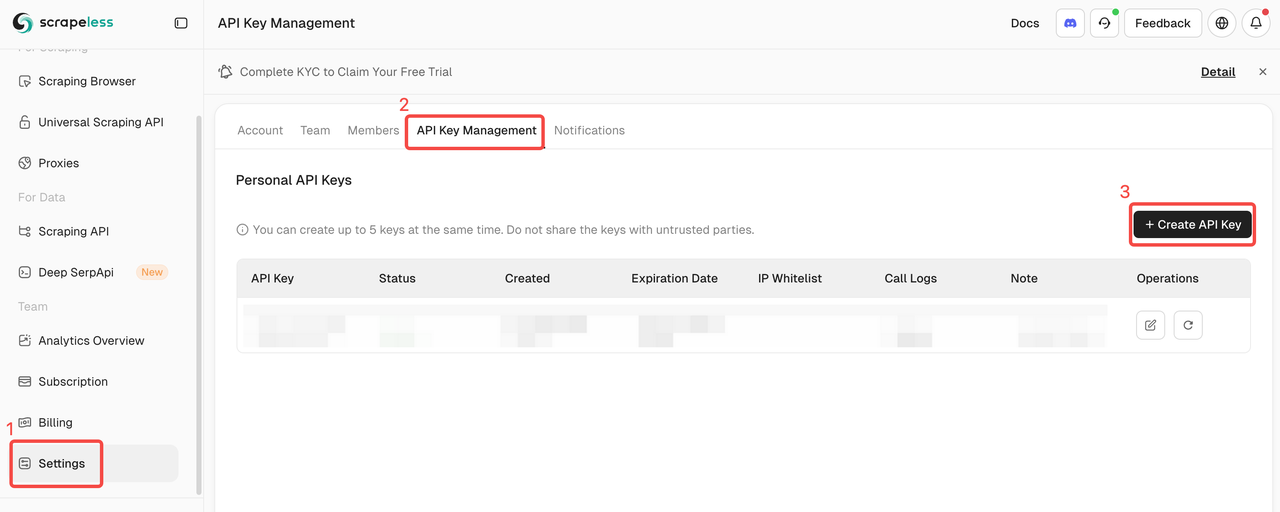
- Log in to the Scrapeless Dashboard(Free trial available)
- Then click "Setting" on the left -> select "API Key Management" -> click "Create API Key". Finally, click the API Key you created to copy it.
- Configure Your MCP Client
Scrapeless MCP Server supports both Stdio and Streamable HTTP transport modes.
🖥️ Stdio (Local Execution)
{
  "mcpServers": {
    "Scrapeless MCP Server": {
      "command": "npx",
      "args": ["-y", "scrapeless-mcp-server"],
      "env": {
        "SCRAPELESS_KEY": "YOUR_SCRAPELESS_KEY"
      }
    }
  }
}
🌐 Streamable HTTP (Hosted API Mode)
{
  "mcpServers": {
    "Scrapeless MCP Server": {
      "type": "streamable-http",
      "url": "https://api.scrapeless.com/mcp",
      "headers": {
        "x-api-token": "YOUR_SCRAPELESS_KEY"
      },
      "disabled": false,
      "alwaysAllow": []
    }
  }
}
Integration with Claude Desktop
- Open Claude Desktop
- Navigate to:
Settings→Tools→MCP Servers - Click "Add MCP Server"
- Paste either the
StdioorStreamable HTTPconfig above - Save and enable the server
- Claude will now be able to issue web queries, extract content, and interact with pages using Scrapeless
Integration with Cursor IDE
- Open Cursor
- Press
Cmd + Shift + Pand search for:Configure MCP Servers - Add the Scrapeless MCP config using the format above
- Save the file and restart Cursor (if needed)
- Now you can ask Cursor things like:
"Search StackOverflow for a solution to this error""Scrape the HTML from this page"
- And it will use Scrapeless in the background.
Supported MCP Tools
| Name | Description |
|---|---|
| google_search | Universal information search engine. |
| google_flights | Exclusive flight information query tool. |
| google_trends | Get trending search data from Google Trends. |
| google_scholar | Search for academic papers on Google Scholar. |
| browser_goto | Navigate browser to a specified URL. |
| browser_go_back | Go back one step in browser history. |
| browser_go_forward | Go forward one step in browser history. |
| browser_click | Click a specific element on the page. |
| browser_type | Type text into a specified input field. |
| browser_press_key | Simulate a key press. |
| browser_wait_for | Wait for a specific page element to appear. |
| browser_wait | Pause execution for a fixed duration. |
| browser_screenshot | Capture a screenshot of the current page. |
| browser_get_html | Get the full HTML of the current page. |
| browser_get_text | Get all visible text from the current page. |
| browser_scroll | Scroll to the bottom of the page. |
| browser_scroll_to | Scroll a specific element into view. |
| scrape_html | Scrape a URL and return its full HTML content. |
| scrape_markdown | Scrape a URL and return its content as Markdown. |
| scrape_screenshot | Capture a high-quality screenshot of any webpage. |
Security Best Practices
When using Scrapeless MCP Server with LLMs (like ChatGPT, Claude, or Cursor), it's critical to handle all scraped or extracted web content with care. Web data is untrusted by default, and improper handling may expose your application to prompt injection or other security vulnerabilities.
✅ Recommended Practices
- Never pass raw scraped content directly into LLM prompts. Raw HTML, JavaScript, or user-generated text may contain hidden injection payloads.
- Sanitize and validate all extracted content. Strip or escape potentially harmful tags and scripts before using content in downstream logic or AI models.
- Prefer structured extraction over free-form text. Use tools like
scrape_html,scrape_markdown, or targetedbrowser_get_textwith known-safe selectors to extract only the content you trust. - Apply domain or selector whitelisting when scraping dynamically generated pages, to restrict data flow to known and trusted sources.
- Log and monitor all outbound requests made via browser or scraping tools, especially if you're handling sensitive data, tokens, or internal network access.
🚫 Avoid
- Injecting scraped HTML directly into prompts
- Letting users specify arbitrary URLs or CSS selectors without validation
- Storing unfiltered scraped content for future prompt usage
Community
Contact Us
For questions, suggestions, or collaboration inquiries, feel free to contact us via:
- Email: market@scrapeless.com
- Official Website: https://www.scrapeless.com
- Community Forum: https://discord.gg/Np4CAHxB9a
Server Config
{
  "mcpServers": {
    "Scrapeless MCP Server": {
      "command": "npx",
      "args": [
        "-y",
        "scrapeless-mcp-server"
      ],
      "env": {
        "SCRAPELESS_KEY": "YOUR_SCRAPELESS_KEY"
      }
    }
  }
}